AI Object Remover for Clean, Distraction-Free Photos
Upload a photo, type what shouldn't be there, and get the same shot back with the distraction gone and the background filled in naturally.
- $0.01per image
- 1photo to upload
- 0prompts to write

How it works
- 1Upload
Add one photo — the form tells you exactly what fits best.
- 2Adjust
Optional fields steer the result: style, mood, text to render.
- 3Download
Get a finished image in seconds, then iterate or try a variation.
Examples
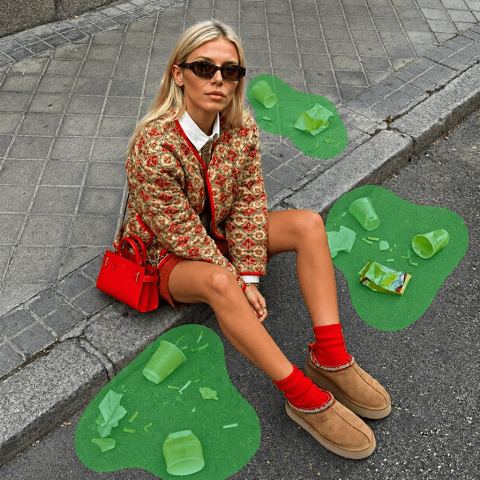
 BeforeAfter
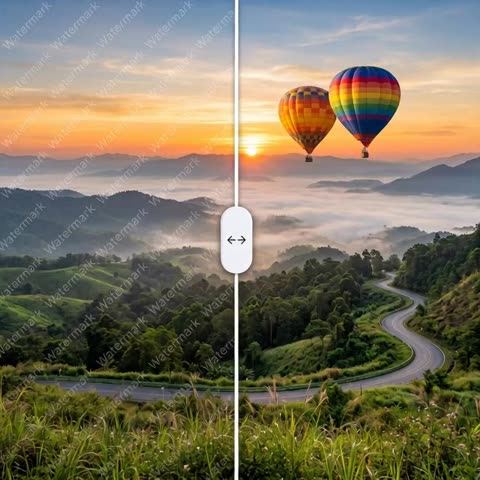
 BeforeAfter
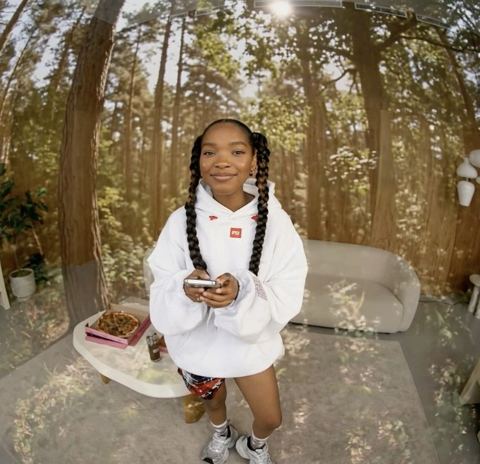
 BeforeAfter
How the AI object remover works
The form has two inputs. Drop your photo into the image field, then describe the thing you want gone in the text field: "trash can by the door," "power lines over the roof," "person walking behind me on the left." There's no brush, no mask and no layer panel to learn.
The AI object remover deletes the item completely and rebuilds whatever would sit behind it — the brick pattern, the sand, the hardwood grain, the skyline. It matches texture, color, lighting and perspective from the surrounding area, and it's instructed to leave everything else in the frame untouched.
Don't love the fill? Generate a variation and the model tries a different reconstruction of the same spot. When you're happy, download the result.
Remove objects from product photos for Amazon, Etsy and Shopify
Most small sellers shoot products on a kitchen counter or a spare desk. That's fine until a charging cable, a coffee mug or a shipping box sneaks into the corner. Instead of restaging and reshooting, type "cable on the right" and the listing image is clean. The product itself stays exactly as it was, which matters: buyers should receive what they saw.
The same goes for lifestyle shots on a Shopify storefront or Pinterest pins. A stray price tag, a fingerprint smudge on the backdrop or a distracting prop pulls attention away from the thing you're selling. Removing it keeps the eye on the product.
Clean up travel, real estate and social content
Your best vacation shot probably has a stranger in it. Photo cleanup with AI lets you remove the tour group in front of the landmark, the scaffolding on the facade or the scooter parked in your frame — and post it to Instagram or TikTok without the clutter.
Realtors and short-term rental hosts use it to tidy listing photos: a laundry rack, personal items on the counter, a neighbor's car in the driveway. The space reads bigger and calmer when nothing competes with it.
Creators and agencies can salvage event and behind-the-scenes photos for LinkedIn posts and client decks, where one badly placed exit sign or water bottle can make an otherwise solid image unusable.
Pay as you go, in your browser or Telegram
The tool runs in the browser at tokion.io and in the Telegram bot @tokionaibot. You pay per generation from one balance, with no subscription, and new accounts get a starter balance to try it. That balance also covers the other image tools, a chat with dozens of models and the API, so teams can script cleanup into their own pipeline.
One important rule: use it only on images you own or have the rights to edit. It isn't meant for stripping credits, signatures or branding from someone else's work.
Who it's for
E-commerce sellers
Delete cables, boxes and stray props from product shots on Amazon, Etsy, Shopify or eBay. Listings look professional without a reshoot, and the product stays true to life.
Realtors and rental hosts
Remove clutter, personal items and parked cars from property photos. Rooms look more spacious and buyers focus on the space itself.
Creators and travelers
Erase crowds, signs and scaffolding from travel shots before posting to Instagram or TikTok. Your face and the scenery stay real.
Agencies and small brands
Rescue event, team and campaign photos with one distracting detail. Drop the cleaned image straight into a deck, post or landing page.
Pro tips
- Be specific about what and where: "blue backpack on the bench to my right" beats "stuff."
- Tackle one object per generation. For several, download the result, upload it again and name the next item.
- Start from the original file, not a screenshot or a messenger-compressed copy — cleaner texture means a cleaner fill.
- For people in the background, remove the farthest figures first; they're easier to erase without traces than someone standing right next to you.
- On product listings, only remove things that don't ship with the item so the photo stays honest.
Good to know
- The area behind a removed object is generated, not recovered, so don't use the tool for documents, evidence or anything that needs to be factual.
- Objects touching a face or hand (glasses, a held bag) may cause small changes to the neighboring detail.
- Very large objects covering half the frame can be removed, but the new scene may differ noticeably from reality.
- Use it only on images you own or have permission to edit.
What it costs
- Pay only for what you generate — no subscription.
- One balance for image tools, chat with 52 AI models and the API.
- Free starter credits when you sign up, no card needed.
Questions
How do I tell the AI what to remove?
Type it in the object field in plain English, like "man in a red jacket behind me." Include color and position when there are several similar items, so the model doesn't remove the wrong one.
Can I remove a person from a photo?
Yes, background people are one of the most common requests. Only do this on your own photos, and respect other people's rights when you publish.
Will the rest of my photo change?
The model is instructed to change only the named object and the area behind it. Colors, lighting, faces and composition elsewhere stay the same.
Is it good enough for Amazon or Etsy listings?
It works well for removing clutter from photos of your own product. Keep the product itself unedited so buyers receive exactly what they saw.
Do I need a subscription?
No. It's pay as you go: each generation is charged to your balance, and new accounts get a starter balance. The same balance works for chat and the API.
What if the fill doesn't look right?
Generate a variation for a different reconstruction, or rewrite the description more precisely. Vague prompts are the most common cause of odd results.
Can I use it from my phone?
Yes. Open tokion.io in a mobile browser or send the photo to the Telegram bot @tokionaibot.
Can I remove a watermark or credit from someone else's image?
No. The tool is for images you own or are licensed to edit. Removing another creator's credit or branding isn't allowed.
More image tools




Try AI Object Remover now
Free starter credits, no credit card. Works in any browser.
Open the tool — free